Plotting Graphs – Data Science with Scala

Data visualization is an integral part of data science. The programming language Scala has many characteristics that make it popular for data science use cases among other languages like R and Python. Immutable data structures and functional constructs are some of the features that make it so attractive to data scientists. Popular big data crunching frameworks like Spark or Flink do have their fair share on an ever growing ecosystem of tools and libraries for data analysis and engineering. Scala is particularly well suited to build robust libraries for scalable data analytics.

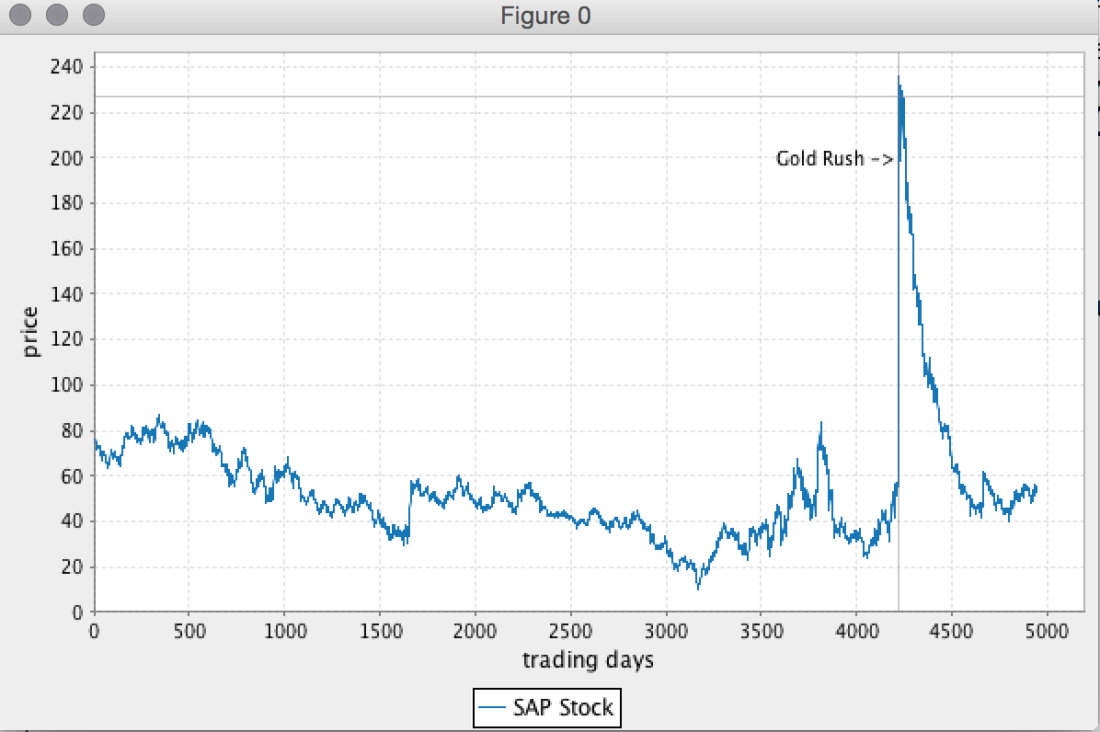
In this post we are going to introduce Breeze, a library for fast linear algebraic manipulation of data sets, together with tools for visualization and NLP. Starting with basic creation of vectors, we will create an application for plotting stock prices. The stock data is obtained form Yahoo Finance, but can also be downloaded here for SAP, YAHOO, BMW, and IBM. Continue reading “Plotting Graphs – Data Science with Scala”
HDP Repo with Nginx

Environments dedicated for a HDP install without connection to the internet require a dedicated HDP repository all nodes have access to. While such a setup can differ slightly depending on the connection, if they have temporary or no internet access, in any case they need a file service holding a copy of the HDP repo. Most enterprises have a dedicated infrastructure in place based on Aptly or Satellite. This post describes the setup of an Nginx host serving as a HDP repository host. Continue reading “HDP Repo with Nginx”

Secure Kafka Java Producer with Kerberos

The most recent release of Kafka 0.9 with it’s comprehensive security implementation has reached an important milestone. In his blog post Kafka Security 101 Ismael from Confluent describes the security features part of the release very well.

As a part II of the here published post about Kafka Security with Kerberos this post discussed a sample implementation of a Java Kafka producer with authentication. It is part of a mini series of posts discussing secure HDP clients, connecting services to a secured cluster, and kerberizing the HDP Sandbox (Download HDP Sandbox). In this effort at the end of this post we will also create a Kafka Servlet to publish messages to a secured broker.

Kafka provides SSL and Kerberos authentication. Only Kerberos is discussed here. Continue reading “Secure Kafka Java Producer with Kerberos”

A Secure HDFS Client Example

It takes about 3 lines of Java code to write a simple HDFS client that can further be used to upload, read or list files. Here is an example:

Configuration conf = new Configuration();
conf.set("fs.defaultFS","hdfs://one.hdp:8020");
FileSystem fs = FileSystem.get(conf);

This file system API gives the developer a generic interface to (any supported) file system depending on the protocol being use, in this case hdfs. This is enough to alter data on the Hadoop Distributed Filesystem, for example to list all the files under the root folder:

FileStatus[] fsStatus = fs.listStatus(new Path("/"));
for(int i = 0; i < fsStatus.length; i++){
   System.out.println(fsStatus[i].getPath().toString());
}

For a secured environment this is not enough, because you would need to consider these further aspects:

  1. A secure protocol
  2. Authentication with Kerberos
  3. Impersonation (proxy user), if designed as a service

What we discuss here for a sample HDFS client can in variance also be applied to other Hadoop clients.

Continue reading “A Secure HDFS Client Example”

Connecting Tomcat to a Kerberized HDP Cluster

At some point you might require to connect your dashboard, data ingestion service or similar to a secured and kerberized HDP cluster. Most Java based webcontainers do support Kerberos for both client and server side communication. Kerberos does require very thoughtful configuration but rewards it’s users with an almost completely transparent authentication implementation that simply works. Steps described in this post should enable you to connect your application with a secured HDP cluster. For further support read the links listed at the end of this writing. A sample project is provided on github for hands-on exercises. Continue reading “Connecting Tomcat to a Kerberized HDP Cluster”

Browsing HDP Public Repo with s3cmd

From time to time it can be very useful to be able to search for HDP repository release directly from the public repo. Especially if you want to search for a recent development or technical preview version. Also this can become handy if you need to create an offline repository for your company intranet.

The HDP repositories are available through Amazon’s S3 storage layer. A tool quite convenient to use it s3cmd.

After downloading it s3cmd can easily be installed based on python:

// requires python-setuptools
$ cd ~/Downloads/
$ tar xfz s3cmd-1.5.2.tar.gz
$ cd s3cmd-1.5.2
$ more INSTALL // to read INSTALL guide
$ sudo python setup.py install

Browing HDP repo:

$ s3cmd ls s3://public-repo-1.hortonworks.com/HDP/centos6/

Using wildcards:

$ s3cmd ls s3://public-repo-1.hortonworks.com/HDP/centos6/2.x/
DIR   s3://public-repo-1.hortonworks.com/HDP/centos6/2.x/2.0-latest/
DIR   s3://public-repo-1.hortonworks.com/HDP/centos6/2.x/2.1-latest/
DIR   s3://public-repo-1.hortonworks.com/HDP/centos6/2.x/2.2-latest/
DIR   s3://public-repo-1.hortonworks.com/HDP/centos6/2.x/2.3-latest/
DIR   s3://public-repo-1.hortonworks.com/HDP/centos6/2.x/GA/
DIR   s3://public-repo-1.hortonworks.com/HDP/centos6/2.x/updates/
2013-07-09 00:06  0  s3://public-repo-1.hortonworks.com/HDP/centos6/2.x/

Wildcards can be used for filtering:

$ s3cmd ls s3://dev.hortonworks.com/HDP/centos6/2.x/updates/2.3.*
DIR   s3://dev.hortonworks.com/HDP/centos6/2.x/updates/2.3.0.0/
DIR   s3://dev.hortonworks.com/HDP/centos6/2.x/updates/2.3.1.0/
DIR   s3://dev.hortonworks.com/HDP/centos6/2.x/updates/2.3.2.0/
DIR   s3://dev.hortonworks.com/HDP/centos6/2.x/updates/2.3.3.0/
DIR   s3://dev.hortonworks.com/HDP/centos6/2.x/updates/2.3.4.0/
DIR   s3://dev.hortonworks.com/HDP/centos6/2.x/updates/2.3.5.0/
DIR   s3://dev.hortonworks.com/HDP/centos6/2.x/updates/2.3.6.0/
DIR   s3://dev.hortonworks.com/HDP/centos6/2.x/updates/2.3.8.0/
DIR   s3://dev.hortonworks.com/HDP/centos6/2.x/updates/2.3.99.0

For help:

$ s3cmd --help

Further Readings

Automated Blueprint Install with Ambari Shell

Ambari Shell is an interactive command line tool to administrate Ambari manged HDP clusters. It supports all available functionality provided by the UI of the Ambari web application. Written as a Java application based on a Groovy REST client it further provides tab completion and a context aware commands. In a previous post we already discussed various contexts like service and state will using REST calls to alter them. Ambari Shell is a convenient tool for managing most of the complex aspects discussed there.

With that it can also be used for automated cluster installs based on Ambari Blueprints. While it is fairly simple to use two curl request to do a blueprint based install, Ambari Shell gives the advantage of monitoring the process. In scripted setups and with the use of provisioning tools like Puppet, Chef, or Ansible it gives the possibility to time setup steps after a complete cluster install. Executing a cluster install with –exitOnFinish true will halt the execution of the script until the install has finished.

An example of this is used as part of this Dockerfile where a parameterized script install_cluster.sh. The below example is being used as part of a Puppet install triggered with Vagrant:

#!/bin/bash

blueprint_name=$1

java -jar /vagrant/bin/ambari-shell.jar --ambari.host=one.hdp << EOF
blueprint add --file /vagrant/blueprints/${blueprint_name}/blueprint.json
cluster build --blueprint ${blueprint_name}
cluster assign --hostGroup node_1 --host one.hdp
cluster create --exitOnFinish true
EOF

sleep 60

Further Readings

Kafka Security with Kerberos

Apache Kafka developed as a durable and fast messaging queue handling real-time data feeds originally did not come with any security approach. Similar to Hadoop Kafka at the beginning was expected to be used in a trusted environment focusing on functionality instead of compliance. With the ever growing popularity and the widespread use of Kafka the community recently picked up traction around a complete security design including authentication with Kerberos and SSL, encryption, and authorization. Judging by the details of the security proposal found here the complete security measures will be included with the 0.9 release of Apache Kafka.

The releases of HDP 2.3 already today support a secure implementation of Kafka with authentication and authorization. Especially the integration with the security framework Apache Ranger this becomes a comprehensive security solution for any Hadoop deployment with real-time data demands. In this post we by example look at how working with a kerberized Kafka broker is different from before. Here working with the known shell tools and a custom Java producer. Continue reading “Kafka Security with Kerberos”

10 Resources for Deep Dive Into Apache Flink

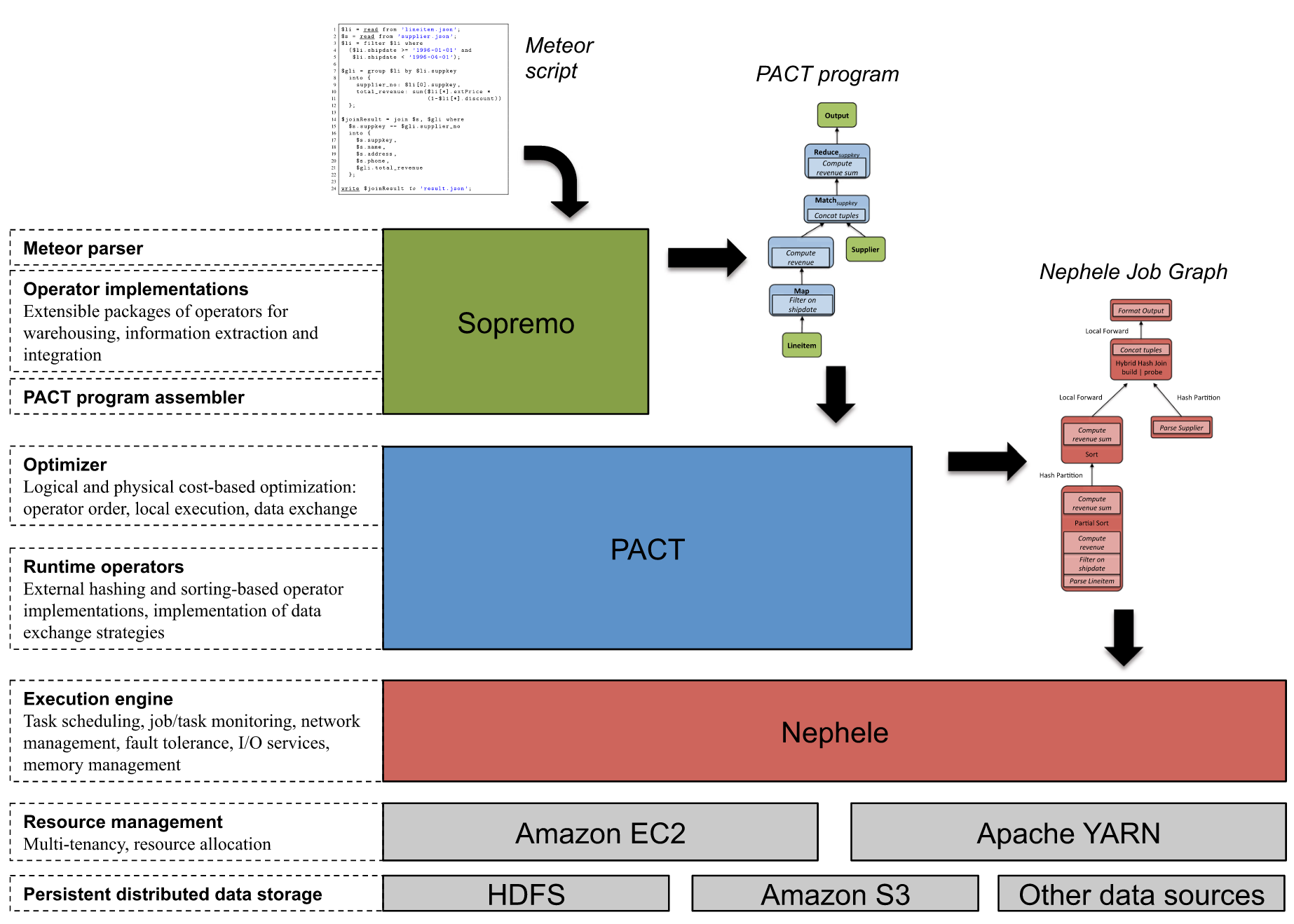
Around 2009 the Stratosphere research project started at the TU Berlin which a few years later was set to become the Apache Flink project. Often compared with Apache Spark in addition to that Apache Flink offers pipelining (inter-operator parallism) to better suite incremental data processing making it more suitable for stream processing. In total the Stratosphere project aimed to provide the following contributions to Big Data processing. Most of it can be found in Flink today:

1 – High-level, declarative language for data analyisis
2 – “in suit” data analysis for external data sources3 – Richer set of primitives as MapReduce
4 – UDFs as first class citizens
5 – Query optimization
6 – Support for iterative processing
7 – Execution engine (Nephele) with external memory query processing

The Architecture of Stratosphere:

The Stratosphere software stack

This posts contains 10 resource highlighting the building foundation of Apache Flink today. Continue reading “10 Resources for Deep Dive Into Apache Flink”

Distcp Between kerberized and none-kerberized Cluster

The standard tool for copying data between two clusters is probably distcp. It can also be used to keep the data of two clusters updated. Here the update process is a asynchronous process using a fairly basic update strategy. Distcp is a simple tool, but some edge cases can get complicated. For once the distributed copy between two HA clusters is such a case. Also important to know is that since the versions of RPC used by HDFS can be different it is always a good idea to use a read only protocol like hftp or webhdfs to copy the data from the source system. So the URL could look like this hftp://source.cluster/users/me . WebHDFS would also work, because it is not using RPC.

Another corner case using distcp is the need to copy data between a secure and none secure cluster. Such a process should always be triggered from the secure cluster. This would be the cluster the owner of the cluster has a valid ticket to authenticate against the secure cluster. But this would still yield an exception as the system would complain about a missing fallback mechanism. On the secure cluster it is important to set the  ipc.client.fallback-to-simple-auth-allowed to true in the core-site.xml  in order to make this work.

<property>
  <name>ipc.client.fallback-to-simple-auth-allowed</name>
  <value>true</value>
</property>

What is left to to is make sure the user has the needed right on both systems to read and write the data.